blog
CollectGuestLogs.exe – High Disk Usage on Azure VM
CollectGuestLogs.exe is one of Microsoft Tools that is installed with VM's stored on Azure. While I'm sure it has many advantages in case of our Client it made sure machines are heavily impacted when it comes to disk speed. During debugging why our machines are so slow I've noticed that CollectGuestLogs.exe is doing some heavy reading on Security.evtx. While normally you wouldn't notice this it seems there is a bug in CollectGuestLogs.exe which manifest itself when Security.evtx file is quite big. For some reason it's not able to process Event Log therefore it continues to read/write to disk all the time 24/7. It can range from 5MB/s to 30MB/s. Quite a hit…

Fortunately there is a fix to this…
💡 How can I fix it?
- Open C:\WindowsAzure
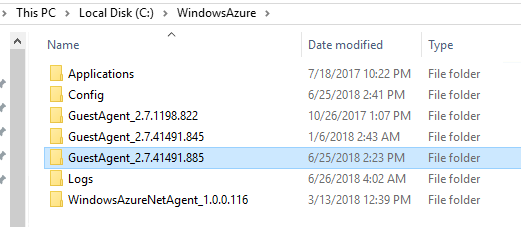
- Find newest version of Guest Agent
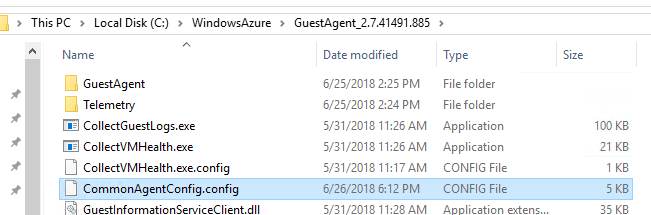
- Find CommonAgentConfig.config and open it up
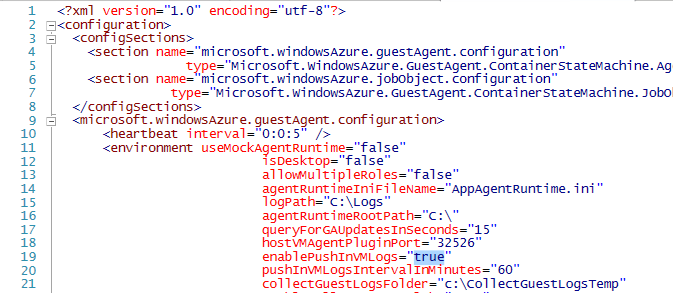
- Find enablePushInVMLogs and set it to false
- Restart **RDAgent **service
That's it!