blog
How to Efficiently Remove Comments from Your PowerShell Script
As part of my daily development, I create lots of code that I subsequently comment on and leave to ensure I understand what I tried, what worked, and what didn't. This is my usual method of solving a problem. Sure, I could commit it to git and then look it up, and I do that, but that doesn't change my behavior where I happen to have lots of “junk” inside of my functions that stay commented out. While this works for me, and I've accepted this as part of my process, I don't believe this should be part of the production code on PowerShellGallery or when the code is deployed.
💡 Function to remove comments from PowerShell file
My goal was to have a PowerShell function that removes any comment inside my code except help comments. Thankfully, with help from Chris Dent, I created a method that eliminates comments from any given file and makes it production ready. While it's part of my module builder PSPublishModule, I'm attaching it if you want to try it on your own.
function Remove-Comments {

    [CmdletBinding(DefaultParameterSetName = 'FilePath')]
    param(
        [Parameter(Mandatory, ParameterSetName = 'FilePath')]
        [alias('FilePath', 'Path', 'LiteralPath')][string] $SourceFilePath,

        [Parameter(Mandatory, ParameterSetName = 'Content')][string] $Content,

        [Parameter(ParameterSetName = 'Content')]
        [Parameter(ParameterSetName = 'FilePath')]
        [alias('Destination')][string] $DestinationFilePath,

        [Parameter(ParameterSetName = 'Content')]
        [Parameter(ParameterSetName = 'FilePath')]
        [switch] $RemoveAllEmptyLines,

        [Parameter(ParameterSetName = 'Content')]
        [Parameter(ParameterSetName = 'FilePath')]
        [switch] $RemoveEmptyLines,

        [Parameter(ParameterSetName = 'Content')]
        [Parameter(ParameterSetName = 'FilePath')]
        [switch] $RemoveCommentsInParamBlock,

        [Parameter(ParameterSetName = 'Content')]
        [Parameter(ParameterSetName = 'FilePath')]
        [switch] $RemoveCommentsBeforeParamBlock,

        [Parameter(ParameterSetName = 'Content')]
        [Parameter(ParameterSetName = 'FilePath')]
        [switch] $DoNotRemoveSignatureBlock
    )
    if ($SourceFilePath) {
        $Fullpath = Resolve-Path -LiteralPath $SourceFilePath
        $Content = [IO.File]::ReadAllText($FullPath, [System.Text.Encoding]::UTF8)
    }

    $Tokens = $Errors = @()
    $Ast = [System.Management.Automation.Language.Parser]::ParseInput($Content, [ref]$Tokens, [ref]$Errors)
    #$functionDefinition = $ast.Find({ $args[0] -is [FunctionDefinitionAst] }, $false)
    $groupedTokens = $Tokens | Group-Object { $_.Extent.StartLineNumber }
    $DoNotRemove = $false
    $DoNotRemoveCommentParam = $false
    $CountParams = 0
    $ParamFound = $false
    $SignatureBlock = $false
    $toRemove = foreach ($line in $groupedTokens) {
        if ($Ast.Body.ParamBlock.Extent.StartLineNumber -gt $line.Name) {
            continue
        }
        $tokens = $line.Group
        for ($i = 0; $i -lt $line.Count; $i++) {
            $token = $tokens[$i]
            if ($token.Extent.StartOffset -lt $Ast.Body.ParamBlock.Extent.StartOffset) {
                continue
            }

            # Lets find comments between function and param block and not remove them
            if ($token.Extent.Text -eq 'function') {
                if (-not $RemoveCommentsBeforeParamBlock) {
                    $DoNotRemove = $true
                }
                continue
            }
            if ($token.Extent.Text -eq 'param') {
                $ParamFound = $true
                $DoNotRemove = $false
            }
            if ($DoNotRemove) {
                continue
            }
            # lets find comments between param block and end of param block
            if ($token.Extent.Text -eq 'param') {
                if (-not $RemoveCommentsInParamBlock) {
                    $DoNotRemoveCommentParam = $true
                }
                continue
            }
            if ($ParamFound -and ($token.Extent.Text -eq '(' -or $token.Extent.Text -eq '@(')) {
                $CountParams += 1
            } elseif ($ParamFound -and $token.Extent.Text -eq ')') {
                $CountParams -= 1
            }
            if ($ParamFound -and $token.Extent.Text -eq ')') {
                if ($CountParams -eq 0) {
                    $DoNotRemoveCommentParam = $false
                    $ParamFound = $false
                }
            }
            if ($DoNotRemoveCommentParam) {
                continue
            }
            # if token not comment we leave it as is
            if ($token.Kind -ne 'Comment') {
                continue
            }

            # kind of useless to not remove signature block if we're not removing comments
            # this changes the structure of a file and signature will be invalid
            if ($DoNotRemoveSignatureBlock) {
                if ($token.Kind -eq 'Comment' -and $token.Text -eq '# SIG # Begin signature block') {
                    $SignatureBlock = $true
                    continue
                }
                if ($SignatureBlock) {
                    if ($token.Kind -eq 'Comment' -and $token.Text -eq '# SIG # End signature block') {
                        $SignatureBlock = $false
                    }
                    continue
                }
            }
            $token
        }
    }
    $toRemove = $toRemove | Sort-Object { $_.Extent.StartOffset } -Descending
    foreach ($token in $toRemove) {
        $StartIndex = $token.Extent.StartOffset
        $HowManyChars = $token.Extent.EndOffset - $token.Extent.StartOffset
        $content = $content.Remove($StartIndex, $HowManyChars)
    }
    if ($RemoveEmptyLines) {
        # Remove empty lines if more than one empty line is found. If it's just one line, leave it as is
        #$Content = $Content -replace '(?m)^\s*$', ''
        #$Content = $Content -replace "(`r?`n){2,}", "`r`n"
        # $Content = $Content -replace "(`r?`n){2,}", "`r`n`r`n"
        $Content = $Content -replace '(?m)^\s*$', ''
        $Content = $Content -replace "(?:`r?`n|\n|\r)", "`r`n"
    }
    if ($RemoveAllEmptyLines) {
        # Remove all empty lines from the content
        $Content = $Content -replace '(?m)^\s*$(\r?\n)?', ''
    }
    if ($Content) {
        $Content = $Content.Trim()
    }
    if ($DestinationFilePath) {
        $Content | Set-Content -Path $DestinationFilePath -Encoding utf8
    } else {
        $Content
    }
}
This function has a couple of parameters:
- SourceFilePath – provide a path to a file you want to clean up
- Content – alternatively to file way, you can also provide a code (for example
Get-Content -Raw $FilePath) - DestinationFilePath – path to file where to save the cleaned-up file. If not provided, the content will be returned directly as a string.
- RemoveEmptyLines – as part of the cleanup, it tries to remove empty lines, but only if there's more than one. This is useful if you have help with the function
- RemoveAllEmptyLines – removes all empty lines from a file
- RemoveCommentsInParamBlock – by default, during cleanup, any comments inside the param block are not removed, as those are often related to help. But if you want, you can also remove those with this switch.
- RemoveCommentsBeforeParamBlock – I don't remove anything between the function and param block by default. This ensures that the help I create for the function stays where it is. But if you want to remove it, this is how you can fix it.
- DoNotRemoveSignatureBlock – by default, we remove any signature from a file, but if you want to prevent that from happening, you can use this switch. It won't give you much because the signature will not work after you remove anything from the file anyways – but it's there.
💡 How does comment removal work?
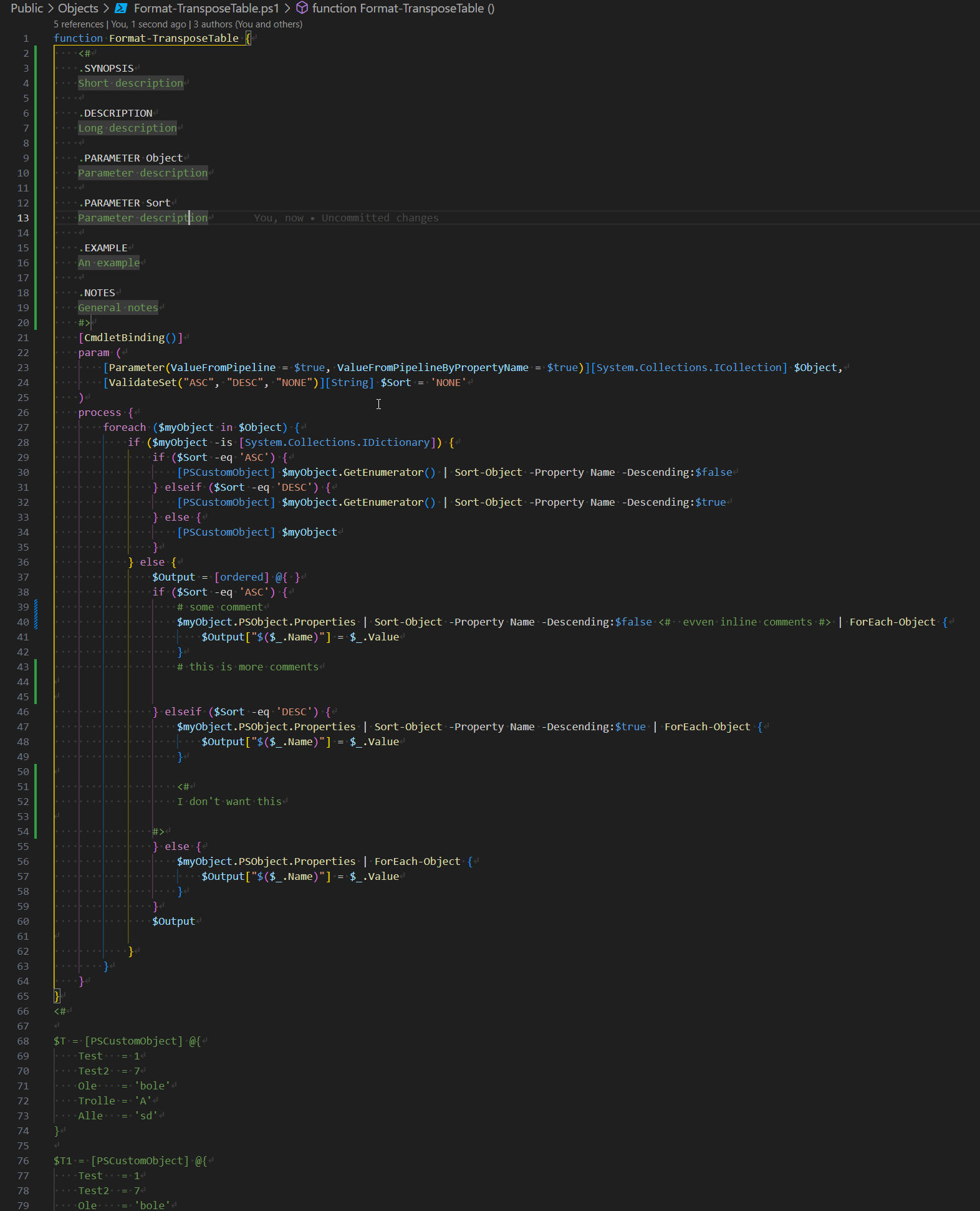
Let's take a look how this works. This is my file that I usually have in my modules:
After applying comment cleanup function
Remove-Comments -FilePath "C:\Support\GitHub\PSSharedGoods\Public\Objects\Format-TransposeTable.ps1" -DestinationFilePath "C:\Support\GitHub\PSSharedGoods\Public\Objects\Format-TransposeTableFixed.ps1" -RemoveEmptyLines

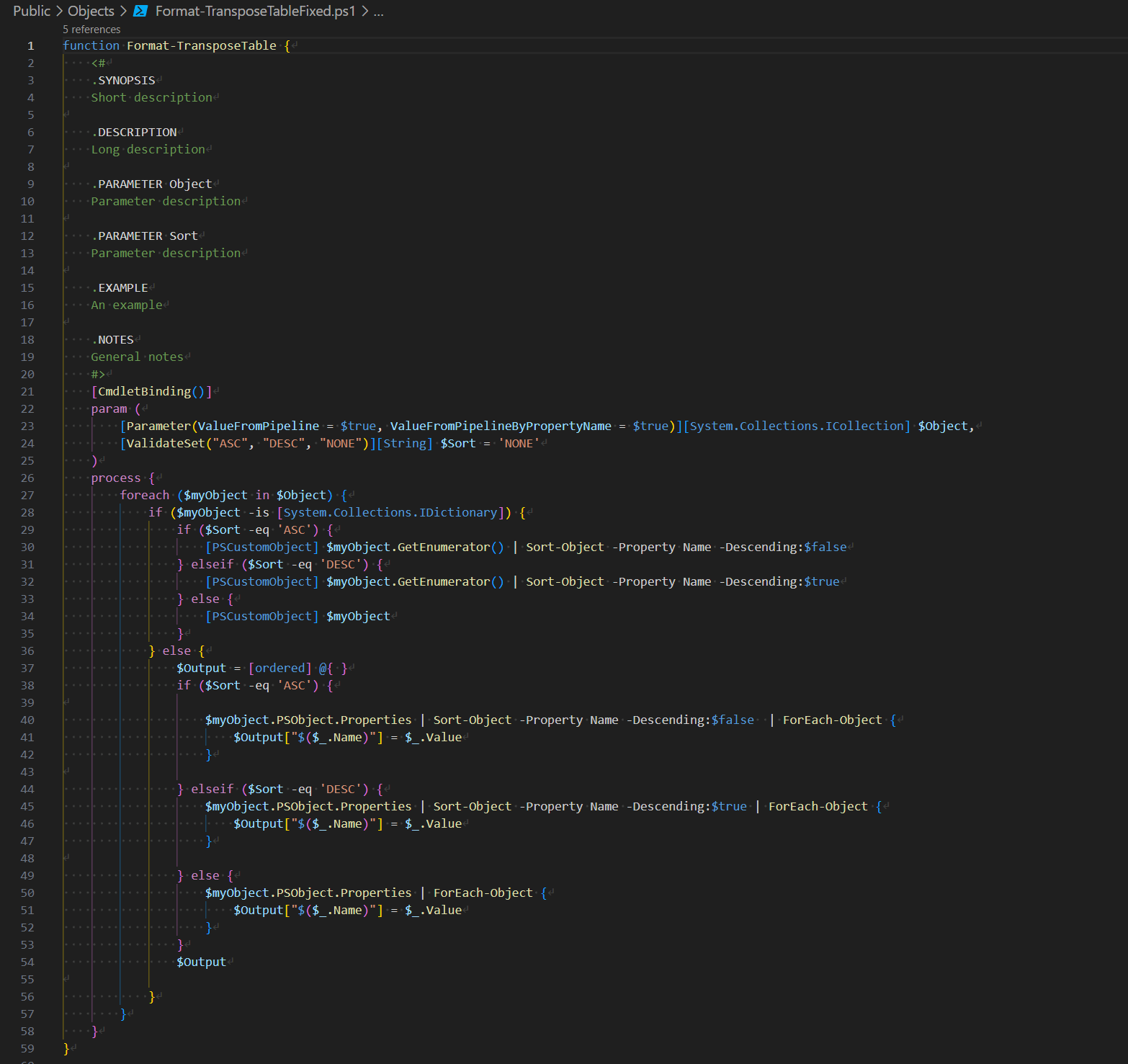
As you can notice, all the “junk” comments were removed, including inline comments. Comments for help were not removed, as per my requirements.